Android Fast Charging Suddenly Not Working Today? The One Charger Check That Usually Brings Your Speed Back In Minutes
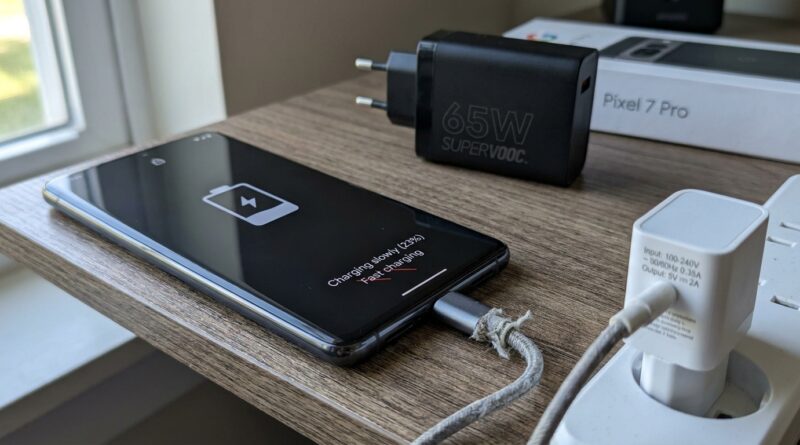
You plug in your phone, glance down for that comforting “Fast charging” message, and it is just. Not. There. Suddenly your battery crawls up like it is charging through a wet piece of string. That is especially maddening when it starts right after an update, a new USB-C cable, or a different wall plug. The good news is this problem is often much less dramatic than it feels. In a lot of cases, the phone is fine. The one check that usually solves it is making sure your charger and cable still match the fast-charging standard your Android expects. If either one changed, or if one part is weaker than you think, your phone drops back to normal slow charging. Before you reset anything, return anything, or blame the update completely, do one simple test with a known-good charger and cable pair. That one swap tells you almost everything in minutes.
⚡ In a Hurry? Key Takeaways
- The fastest way to fix android fast charging not working after update is to test the phone with the original or a known-good fast charger and matching cable.
- If the fast-charging message returns with a different charger setup, the problem is usually the cable, power brick, or charging standard mismatch, not the phone.
- Do not force random cheap chargers. Slow charging is annoying, but using the wrong gear can cause heat, unstable charging, and extra wear.
The one charger check that solves this for most people
Here is the check.
Take your phone and plug it into a charger and cable that you know used to fast charge it properly. Ideally, that means the original charger and original cable that came with the phone, or a trusted replacement from a decent brand that supports the same fast-charging system.
If fast charging comes back right away, you have your answer. Your phone probably did not suddenly lose the ability to charge quickly. The new cable, newer wall adapter, bedside charger, or multi-port plug is the weak link.
This is the bit many people miss. A USB-C cable fitting your phone does not mean it can carry the same charging speed. And a power brick saying “fast charger” on the box does not mean it speaks the same charging language as your Samsung, Pixel, Motorola, OnePlus, or Xiaomi phone.
Why this often happens after an update
It is easy to blame the update, and sometimes the timing is not a coincidence.
After a software update, Android may become stricter about heat, battery health, power delivery, or accessory detection. A cable or charger that was borderline before can suddenly stop triggering fast charging. The update did not necessarily break charging. It may just be less willing to push higher wattage through a setup that is not quite right.
That is why the search for android fast charging not working after update has become so common. People update their phone, notice charging is slower, and assume the software is fully at fault. Sometimes it is. But just as often, the update exposes a charger or cable problem that was already there.
What “matching” really means in plain English
Think of charging as a three-part conversation between your phone, the cable, and the charger.
All three need to agree.
Power brick
Your charger needs enough wattage and the right charging standard. For example, some phones want USB Power Delivery, some use Samsung Super Fast Charging, and some brands use their own faster systems that only work properly with the brand’s own charger.
USB-C cable
The cable also matters. A cheap or older cable may charge, but only at basic speed. Some cables are built for data and light charging, not higher power.
Your phone
The phone decides what it will accept based on battery temperature, battery level, and how safe the setup looks. If anything seems off, it drops to slower charging.
Do these quick checks before you buy anything
1. Look for the charging message
When you plug in the phone, watch the lock screen or battery settings. Does it say “Fast charging,” “Rapid charging,” “Super fast charging,” or just “Charging”?
If it only says “Charging,” that is a clue. The phone is not seeing the full setup it wants.
2. Swap only one part at a time
Do not change everything at once.
Try your current charger with a different cable. Then try a different charger with the same cable. That makes it much easier to spot the bad actor.
3. Check the charging port for fluff and pocket lint
This sounds silly until it works.
Pocket lint in the USB-C port can stop the cable from seating properly, which affects charging speed. Use a flashlight. If you see debris, clean it very gently with a wooden toothpick or a soft plastic tool. Do not jab metal into the port.
4. Restart the phone
Yes, really.
If the issue started right after an update, a restart can clear a temporary power-management glitch.
5. Check battery settings
Some Android phones now include battery protection options that slow charging on purpose during parts of the day or stop at 80 percent to protect battery health. Look in Settings, then Battery, then charging or battery protection features.
The most common charger mistakes I see
Using a lower-power multi-port charger
Some wall chargers promise big numbers, but only if one device is plugged in. Add a second device and your phone may get much less power.
Using an old cable with a new fast charger
The plug fits, so it feels fine. But the cable may not support the speed.
Buying a charger that says “compatible with USB-C”
That tells you almost nothing about speed. Compatibility is not the same as fast charging support.
Wireless charging expectations
If you recently switched to a wireless pad, remember that wireless charging is often slower unless you are using the exact charger and adapter combo your phone maker recommends.
What if the phone gets warm and slows down?
That can happen even with a good charger.
Android phones often reduce charging speed when they get too warm. So if your phone fast charges for a few minutes and then slows right down, heat may be the real issue. If that sounds familiar, read How to Stop Your Phone From Overheating While Charging (Without Buying a New One). It covers the simple things that make a bigger difference than most people expect.
When the update really is the problem
Sometimes the software is genuinely involved.
If fast charging worked with the same cable and charger before the update, and now it fails with multiple known-good chargers, then the update may have changed charging behavior or caused a bug.
Here is what to do next:
- Install any newer system patch. Phone makers often fix charging bugs quietly.
- Boot into Safe Mode to see if a battery or device-management app is interfering.
- Reset settings, not the whole phone, if your model offers that option.
- Check your brand’s support forum for others reporting the same issue.
I would save a full factory reset for last. It is a lot of hassle, and in charger-related cases it usually does not fix the real problem anyway.
Signs the cable is the culprit
- Charging speed changes if you wiggle the cable
- The cable works for charging, but no longer fast charging
- The cable feels loose in the port
- Another cable immediately restores fast charging
Signs the power brick is the culprit
- Your phone fast charges from a laptop USB-C port or another wall charger, but not this plug
- The charger now takes hours with more than one device connected
- The charger gets unusually hot or makes faint buzzing noises
- It supports a different fast-charging standard than your phone needs
Signs the phone may need repair
- No charger and cable combo restores fast charging
- The phone only charges at a certain angle
- The USB-C port feels damaged or loose
- You see moisture, corrosion, or repeated charging error messages
If you get to this point, it is worth having the port checked before spending money on piles of replacement chargers.
At a Glance: Comparison
| Feature/Aspect | Details | Verdict |
|---|---|---|
| Original charger and cable test | Best way to confirm if the issue is your current accessories or the phone itself | Start here first |
| Random USB-C cable swap | Some cables charge fine but cannot support higher-speed power delivery | Very common cause |
| Full phone reset | Takes time and rarely fixes a bad charger, bad cable, or port issue | Leave as a last resort |
Conclusion
When fast charging suddenly disappears, it feels like your phone has developed a major fault overnight. Usually, it has not. More often, this is one of those irritating little real-world problems caused by a cable swap, a different charger, heat, or an update making your phone fussier about power. The quickest way through it is the simple charger check. Go back to a known-good fast charger and matching cable, then swap one part at a time. That small test can save you from hours of guesswork, pointless factory resets, and returning perfectly good products that were never the problem. Fast charging failures are now one of the most common Android complaints, especially after updates and accessory changes. The good news is that with a calm, non-technical check, you can usually work out whether the charger, cable, or phone is at fault in just a few minutes. That is the kind of practical fix most people actually need.