How to Speed Up a Slow Android Phone in 5 Minutes Without Installing Any Cleaner Apps
Your Android phone used to be quick, and now it hesitates on everything. Apps open late, scrolling stutters, and even typing can feel “sticky.” That’s genuinely annoying, especially when you keep seeing ads for “phone booster” apps that promise miracles but feel a little sketchy. Good news. You can usually get a noticeable speed bump in about five minutes using only built-in settings. No cleaners. No risky permissions. No touching your photos or messages.
⚡ In a Hurry? Key Takeaways
- Skip “booster/cleaner” apps. Clear cache for your biggest apps, uninstall unused apps, and switch off live wallpapers.
- Clear cache (not storage/data) for heavy hitters like Chrome, Instagram, TikTok, Facebook, YouTube, and your main browser.
- These steps are safe and reversible. They free space and reduce background strain without deleting photos, texts, or accounts.
The 5-Minute Speed-Up (No Extra Apps)
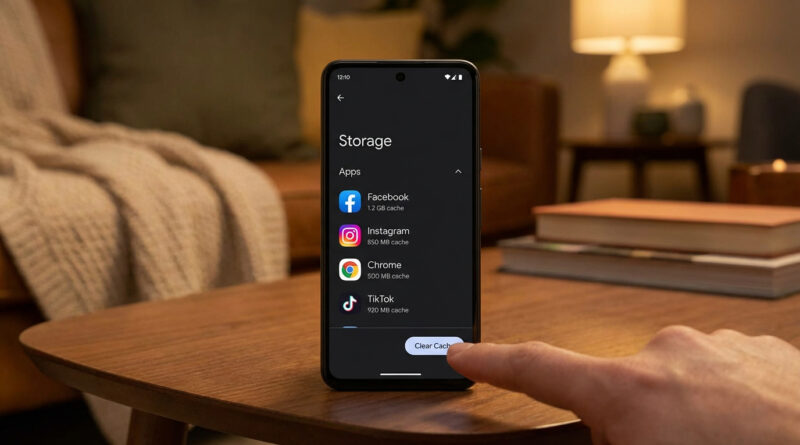
1) Clear cache for the apps that hog the most
Cache is “temporary junk drawer” data apps build up to feel faster. Over time it can get bloated and do the opposite. Clearing cache often gives an instant improvement, especially for social apps and browsers.
Do this:
Settings → Apps (or “Apps & notifications”) → See all apps → tap an app (start with your top 5) → Storage & cache → Clear cache.
Start with: Chrome (or your browser), Instagram, TikTok, Facebook, YouTube, Snapchat, X, Gmail, Maps.
Important: Tap Clear cache, not Clear storage (sometimes called “Clear data”). Clearing storage can sign you out and remove downloaded content.
2) Uninstall apps you haven’t opened in 30 days
Unused apps still take storage, may run background services, and can slow down updates. If you haven’t opened it in a month, you probably won’t miss it.
Quick way: Settings → Apps → sort by “Last used” (if your phone offers it) → uninstall anything you don’t recognize or don’t use.
Tip: If you’re unsure, uninstall the obvious ones first: old games, duplicate shopping apps, “trial” utilities, and anything you downloaded for one trip or one event.
3) Switch from a live wallpaper to a still image
Live wallpapers look cool, but they keep your phone’s graphics working harder than it needs to. On older phones, this can add lag you feel everywhere.
Do this: Long-press the home screen → Wallpaper → choose a static image.
Two Quick Checks Most People Miss
Restart once, on purpose
This sounds too simple, but it clears out stuck background processes and gives your phone a clean slate. Hold the power button, then tap Restart. If you don’t have Restart, power off, wait 10 seconds, then power on.
Make sure your storage isn’t nearly full
When storage is packed, Android has less room to work and things can crawl. Check: Settings → Storage. If you’re above roughly 85 to 90% full, freeing space can help a lot.
If your biggest space hog is photos, you don’t have to guess or delete memories in a panic. The iPhone guide is still a good mindset for safe photo cleanup, and the backup ideas translate well even if your main phone is Android: How to Stop Your iPhone Photos Filling Up iCloud and Still Keep Your Memories Safe.
Why I Don’t Recommend “Cleaner” or “Booster” Apps
Most booster apps do one of three things: close apps you’ll just reopen, spam notifications, or ask for broad permissions they don’t need. Android already manages memory well. The real wins are reducing junk cache, removing unused apps, and cutting down on flashy background effects.
At a Glance: Comparison
| Feature/Aspect | Details | Verdict |
|---|---|---|
| Clearing cache (per app) | Removes temporary files that can bloat over time. Doesn’t delete your photos or texts. | Best “instant fix” in minutes |
| Uninstalling unused apps | Frees storage, reduces background services, and trims update load. | High impact, very safe |
| Switching off live wallpaper | Cuts down GPU/CPU work and background animation overhead. | Small change, surprisingly noticeable |
Conclusion
A slow phone can make you feel pushed into risky cleaner apps or an expensive upgrade you didn’t plan for. Try the five-minute reset instead: clear cache on the big apps, uninstall what you don’t use, and ditch the live wallpaper. It’s simple, it’s safe, and it often makes your current phone feel like itself again, starting today.