The Best Way to Make ChatGPT and Other AI Tools Give You Straight Answers
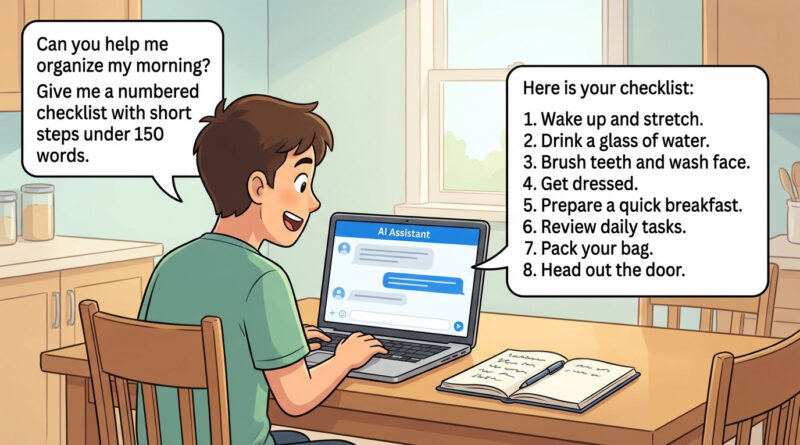
You ask an AI a simple question, and it answers like it’s trying to hit a word count. You get five paragraphs of “context,” a bunch of polite hedging, and somehow… not the exact steps you needed. If that sounds familiar, you’re not doing anything wrong. Most AI tools default to being chatty, safe, and general. The fix is surprisingly small. Before your question, add one line that tells it exactly what shape you want the answer to be, then cap the length. That little bit of structure pushes the AI out of lecture mode and into “helpful assistant” mode. You’ll spend less time scrolling and more time actually doing the thing, whether it’s changing a setting, learning a new app, or troubleshooting a device.
⚡ In a Hurry? Key Takeaways
- Add a “format line” before your question (example: “Give me a numbered checklist with short steps”).
- Set a hard limit (example: “Keep it under 120 words” or “Max 8 steps”).
- If it still rambles, say “Answer only the question. No background.” and ask for one clarifying question if needed.
The One-Line Trick That Changes Everything
AI tools are good at guessing what you want. The problem is they often guess “a helpful explainer,” not “a person standing next to me telling me what to click.” So you fix the guessing.
Copy-and-paste starter line
“Give me a numbered checklist with short steps I can follow. Keep it under 120 words.”
Then ask your real question right after it.
Why this works
You’re doing two things:
- Forcing a format (checklist, steps, bullets) so it can’t wander.
- Setting a boundary (word count or step limit) so it has to prioritize.
Better Prompts: 5 Templates You’ll Actually Use
1) When you want the quickest “just tell me what to do” answer
Prompt: “Give me a numbered checklist with short steps. Keep it under 100 words. My question: [paste question].”
2) When you’re fixing something and want safe steps
Prompt: “Give me a checklist. Include a ‘Stop if…’ warning step if there’s any risk. Under 140 words. Problem: [describe issue].”
3) When the AI keeps dodging with “it depends”
Prompt: “If the answer depends on something, ask me 1 clarifying question first. Otherwise give a checklist under 120 words. Question: [your question].”
4) When you need settings paths (the clicks)
Prompt: “Give me exact click paths (like Settings > Privacy > …). Max 8 steps. Under 130 words. Task: [task]. Device: [Windows/Mac/iPhone/Android].”
5) When you want a decision, not a brainstorm
Prompt: “Pick one best option for my situation and tell me why in 2 sentences. Then give a checklist. Under 160 words. Situation: [details].”
A Real Example (Before and After)
Before (what people usually type)
“How do I free up space on my laptop?”
You often get a long explanation of storage types, caches, temporary files, cloud syncing, and philosophical advice about organizing your digital life.
After (same question, but structured)
“Give me a numbered checklist with short steps I can follow. Keep it under 120 words. How do I free up space on my Windows laptop without deleting photos?”
That tends to produce something you can act on right away. And if you want a solid, human-tested version of that exact task, here’s a walkthrough I like: How to Free Up Space on a Windows or Mac Laptop Without Deleting Photos. Notice how it starts with one focused win (sorting Downloads by size) instead of scattering your attention.
How to “Correct” the AI When It Ignores You
Sometimes it still rambles. Don’t start over. Just reply with a tight correction.
Use this reset message
“Rewrite that as a numbered checklist. Short steps only. Max 8 steps. Under 120 words. No background.”
If you suspect it’s guessing
“What are the top 2 things you need to know to answer accurately? Ask only those questions.”
If you want sources (without a research essay)
“Give me the checklist. Then list 2 sources as links. No quotes.”
At a Glance: Comparison
| Feature/Aspect | Details | Verdict |
|---|---|---|
| Answer format | Default replies are often paragraphs and “helpful context.” Your prompt can demand steps, bullets, or a table. | Always specify the format. |
| Length control | A word limit or max-step limit forces it to prioritize the most useful actions. | Add a hard cap every time. |
| Clarity when info is missing | Without guidance, it guesses. With “ask 1 clarifying question,” it fills the gap first. | Tell it when to ask, not guess. |
Conclusion
If you’re tired of fluffy AI answers, don’t fight the tool. Box it in. One line that demands a checklist and one line that limits length can turn ChatGPT and similar tools into something that feels less like a chatty toy and more like a useful helper. This matters right now because so many people are trying AI for everyday problems and bouncing off the style of the replies. Give it a clear shape, keep it short, and you’ll get answers you can actually use.