How to Stop Android Phones From Showing Too Many Notifications
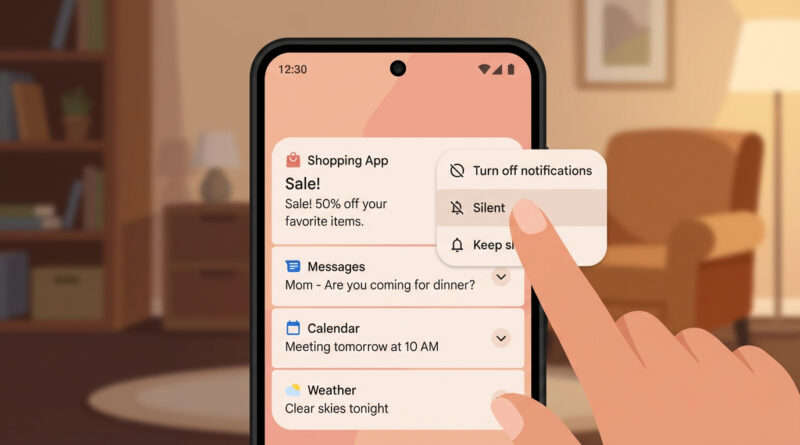
If your Android phone buzzes all day with game “rewards,” shopping “deals,” and random promos, you are not alone. It is exhausting, and the worst part is that the important stuff, texts, delivery updates, work messages, gets buried in the noise. Then you try to fix it in Settings and it feels like a maze of switches you are supposed to understand upfront. Here is the calmer way to do it. For one week, treat every notification like a simple yes or no question. When one pops up, long-press it. If you do not want to see that kind again, tap the little settings or gear icon and turn it off or set it to silent right there. Slow cleanup beats one big confusing overhaul.
⚡ In a Hurry? Key Takeaways
- Long-press notifications as they arrive, then turn that app’s alerts off or to Silent on the spot.
- Do it for one week so your notification setup matches your real life, not a guess in Settings.
- You can silence marketing noise without breaking important alerts like calls, texts, alarms, and shipping updates.
The “One-Week Yes or No” Notification Reset
Instead of camping in Settings, you clean up notifications in the moment, while you still remember how you feel about that alert.
Step 1: Long-press the notification
When a notification shows up, press and hold on it. Most Android phones will pop up a small control panel.
Step 2: Choose what happens next time
You will usually see options like:
- Turn off (best for promos, games, “we miss you,” and spammy reminders)
- Silent (good for things you might want later, but not right now, like store receipts or loyalty points)
- Alerting (keep it loud for truly important apps like your bank, family chat, or work tools)
If there is a little gear icon or the word Settings, tap it. That takes you straight to the right screen for that app’s notifications, without hunting through menus.
Step 3: Repeat, but only when it interrupts you
This is the secret. You are not trying to “optimize” everything. You are only fixing the alerts that actually bother you. After a week, the noisy apps have basically trained themselves out of your day.
What to Turn Off First (The Usual Repeat Offenders)
If you want a cheat sheet for what to swipe away forever, start here:
- Games: “energy full,” “daily gift,” “limited event,” “your base is under attack”
- Shopping apps: “price drop,” “flash sale,” “recommended for you,” “items in your cart”
- News and sports: breaking news (unless you truly want it), live score updates
- Random “tips” notifications: apps trying to pull you back in
Keep the useful ones. For example, shopping apps can be loud and annoying, but delivery and shipping updates might still be worth keeping on.
When You Should Use “Silent” Instead of “Off”
Silent is your middle ground. It keeps the notification in your shade, but it stops hijacking your attention.
- Calendar reminders: if you want them, but not buzzing like an emergency
- Email: silence general inbox alerts, keep only VIP or account security alerts
- Work apps: silence channels that are mostly chatter, keep direct mentions
If the Controls Look Different on Your Phone
Android varies a bit by brand (Samsung, Pixel, OnePlus), but the idea stays the same. Long-press the notification, then look for:
- Turn off notifications
- Silent
- Settings or a gear icon
If you get stuck and want a clean, simple checklist, you can even ask an AI tool for steps that match your phone model. I like the approach in The Best Way to Make ChatGPT and Other AI Tools Give You Straight Answers. The trick is to ask for short, numbered steps, and cap the length so it does not wander.
Two “Don’t Break Anything” Tips
Tip 1: Keep security and account alerts on
Bank logins, password reset codes, and fraud alerts should usually stay enabled. If you want less noise, silence marketing categories but keep the security ones.
Tip 2: Be careful with messaging apps
For texts and chat apps, do not turn everything off unless you mean it. Instead, use Silent for group chats that spam, and keep alerts for direct messages.
At a Glance: Comparison
| Feature/Aspect | Details | Verdict |
|---|---|---|
| One big Settings cleanup | Fast, but confusing. Easy to miss what each toggle actually does in daily life. | Okay for power users. Overkill for most people. |
| One-week “long-press and decide” method | Adjusts as real notifications appear. No guesswork. No menu hunting. | Best balance of simple and effective. |
| Silent vs Off | Silent keeps info available without buzzing. Off removes it completely. | Use Silent for “maybe later,” Off for marketing noise. |
Conclusion
You do not need to master every Android notification setting to get your phone under control. Just answer one question each time your phone interrupts you: “Do I want this again?” Long-press, then turn it off or set it to Silent. Do that for a week and the constant buzzing fades fast, without you having to study a crowded settings menu. It is a relief, especially now that more apps are pushing aggressive promo alerts that make phones feel noisy all day.